

- Open marivecta.com and explore the navigation groups.
- Enter a vessel, port, lesson or tool name in search; select a suggestion or view all results.
- Choose a language and day/night mode. Layout varies by theme.
MARIVECTA / DOCUMENTATIONV157.0.0
How can we help you?
Find a topic, follow the steps and start using the tools.
USER GUIDES
22 topicsExplore topics
No matching results.
Try a different word or reset the filters.
Getting started
Account and sign-in3 steps
- Open My account and register if registration is enabled.
- Sign in with your email and password.
- Use email verification or recovery when available; sign out on shared devices.
Favorites and personal workspace3 steps
- Choose frequently used tools in the workspace.
- Mark favorites and reopen recently used shortcuts.
- Manage account records and dashboard visibility. Browser preferences may not sync.
Mobile app and offline access3 steps
- Open the mobile app section and follow your browser installation prompt.
- Open needed tools before losing connectivity.
- Reconnect for live data and interactive maps.
Sea and weather
Marine weather3 steps
- Choose a location or coordinates.
- Request the forecast and check the map position.
- Review available 72-hour wind/wave forecasts in UTC and verify with official sources.
Tide predictions3 steps
- Select a NOAA station or enter its code.
- Choose the date and request predictions.
- Review high/low water in UTC and metres relative to MLLW; verify official tide information.
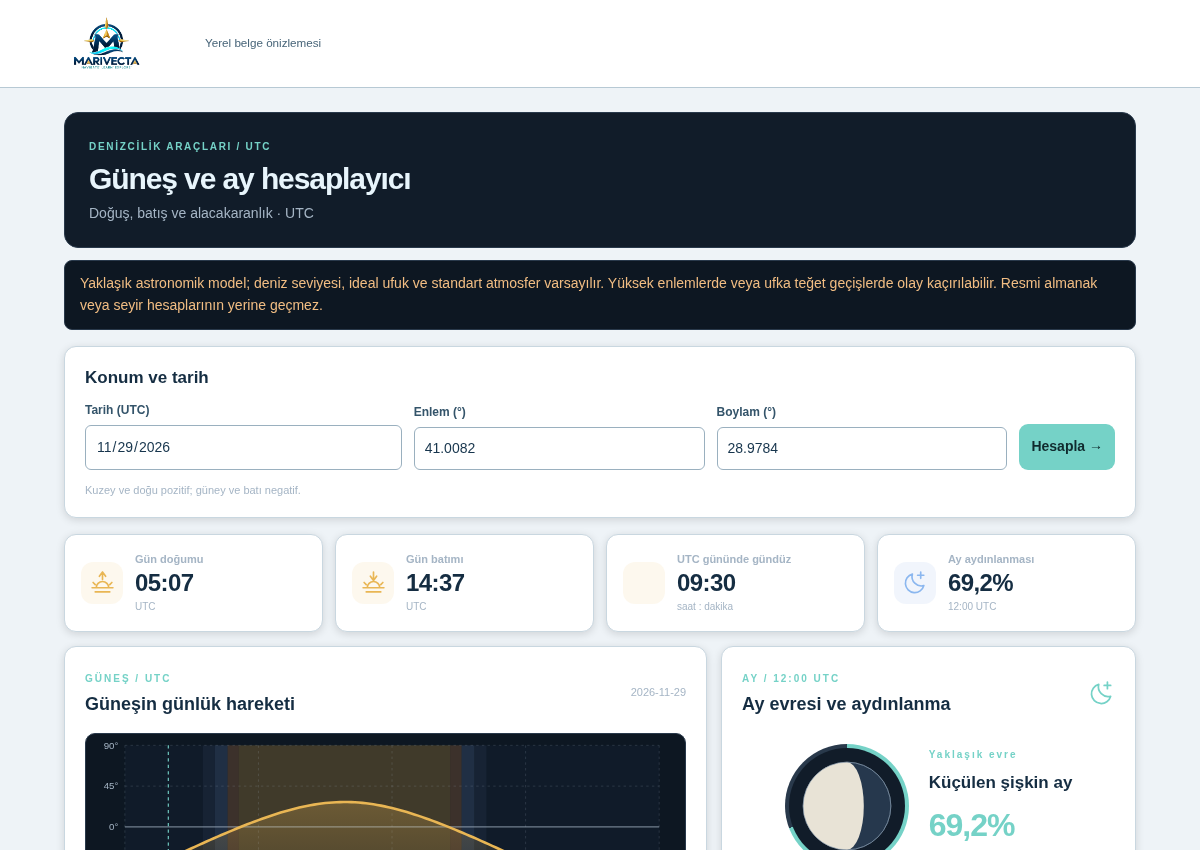
Sun, moon and twilight3 steps
- Enter a UTC date (2000–2099), latitude and longitude.
- Calculate and review rise/set and twilight events.
- Read the UTC table and visualisation; check official almanacs for operational use.
Academy
Learning center3 steps
- Open the Learning center and select a category or lesson.
- Read the lesson and complete its knowledge check.
- Sign in to review and print available progress records.
Exams, results and certificates3 steps
- Find a quiz by topic, complete it and inspect answer review.
- Sign in for history and eligible documents.
- Use the document verification page with the code on the document. Not an official qualification.
COLREG, signal flags and dictionary3 steps
- Choose a COLREG lesson or rule.
- Browse signal flags and dictionary entries.
- Consult the voyage guide and verify against official publications.
Content and careers
Articles and news3 steps
- Open Articles or News, browse categories and search where available.
- Read publication dates and sources.
- Verify external links and information.
Careers and companies3 steps
- Browse active vacancies and available filters.
- Read requirements and check external application links.
- Sign in to save available vacancies; browse the company directory.
Maritime CV3 steps
- Sign in and open Maritime CV.
- Enter personal and professional details, save and inspect the print layout.
- Print or save as PDF; review personal information before sharing.
Community and notifications3 steps
- Browse community topics and sign in to submit permitted posts or replies.
- Check moderation status and read notifications.
- Manage subscription preferences in your account.
Bahriyeli Collection3 steps
- Browse product recommendations and details.
- Follow the purchase link to Bahriyeli.net.
- Confirm current prices, stock, sizing and delivery in the shop.
Support
Troubleshooting and contact3 steps
- Refresh and check connectivity; try another browser if needed.
- Use account recovery for sign-in issues.
- Contact support with page URL, device, browser and non-sensitive error screenshot.
Calculator catalog
DD ↔ DMSCoordinate converterConvert decimal degrees and degrees, minutes, seconds.GCGreat-circle distanceCalculate the shortest spherical distance between two coordinates.BRGInitial bearingCalculate initial true bearing between two positions.RLRhumb line distance and courseSpherical distance and course assuming constant true course along the rhumb line.KNRequired speedRequired average speed from distance and target duration.UTCETA and travel timeIllustrative arrival time from distance, speed and UTC departure.TFuel consumptionTotal fuel estimate assuming constant daily consumption.NMMaritime unit converterConvert nautical miles, kilometres, knots and km/h.D/TDistance travelledIllustrative distance from constant speed and duration.F/HFuel enduranceIllustrative duration from available fuel, reserved fuel and constant consumption.RBRelative bearing conversionCalculate the angular relationship between true heading and relative bearing.C/M/TCompass bearing conversionConvert a compass angle using supplied deviation and magnetic variation.SOGCurrent effect (SOG/COG)Calculate motion over ground from through-water motion and current vectors.AVGTwo-leg voyage averageCalculate total distance, duration and average speed for two legs and a waiting period.Δ°Course angle differenceFind the smallest angular difference and its direction between two true courses.COSTFuel cost estimateEstimate fuel cost from duration, daily consumption and an entered price per tonne.XTECross-track offsetEstimate lateral and along-track offsets from a fixed course and measured position difference.FUELFuel and reserve planEstimate total fuel from constant consumption, voyage duration and user-defined reserve.
Frequently asked questions
Can I use this for actual navigation?
No. These are educational tools, not a substitute for official navigation sources.
Why are some features unavailable?
Availability varies with theme, membership, settings, source data and connectivity.
What language is the PDF?
This release provides a Turkish PDF and English summaries online.
Why are my favorites missing on another device?
Browser preferences are not synced across devices. Account records are separate.
Why do I see English after switching language?
Some sections are not available in every language and may fall back to English.
What should I include in a support request?
Include the page URL, device, browser and error message. Never share passwords or private information.
Still need help?
Tell us about your issue on the contact page.